How to Run, Stop, and Schedule an Email Drip Campaign

It is possible to personalize navigation menus within Mindmatrix software. If you are unable to navigate to the correct page, contact your platform administrator.
How do I stop/pause an email drip campaign?
You can stop an email drip campaign by logging into the user account that is running the email drip. Go to Manage > Campaigns > Drip (Nurturing)
Click on the drip you would like to stop. It should have a current state that says “Running”.
Once stopped, the drip campaign will show “Stopped” as the current state.
How do I start (Play) an email drip campaign that’s been stopped?
You can start (Play) an email drip campaign by logging into the user account that is running the email drip. Go to Manage > Campaigns > Drip (Nurturing)
Click on the drip you would like to stop. It should have a current state that says “Stopped”.
Once stopped, the drip campaign will show “Running” as the current state.
How do I schedule an email drip campaign?
Note: If you schedule a drip campaign, it will start at the first step in that campaign. If that first step is a delay, then it will start with the delay.
You can schedule an email drip campaign by logging into the user account that is running the email drip. Go to Manage > Campaigns > Drip (Nurturing)
If you are just beginning to Setup a new campaign, use the following process:
- Start with starting a campaign like you normally would by clicking Setup on the template you’d like to use
- On the fourth tab, (4) Contacts, use the drop-down arrow next to Schedule Drip to expand the scheduling tool.
- Set your Start On date, and/or your End On date (leave the end date blank if you do not want to have the campaign stop running on a set date)
If you are scheduling a campaign that is already setup, use the following process:
- Click Scheduled on the setup campaign to pick a date to schedule it.
You can set your Start On date, and/or your End On date as mentioned in above step 3.
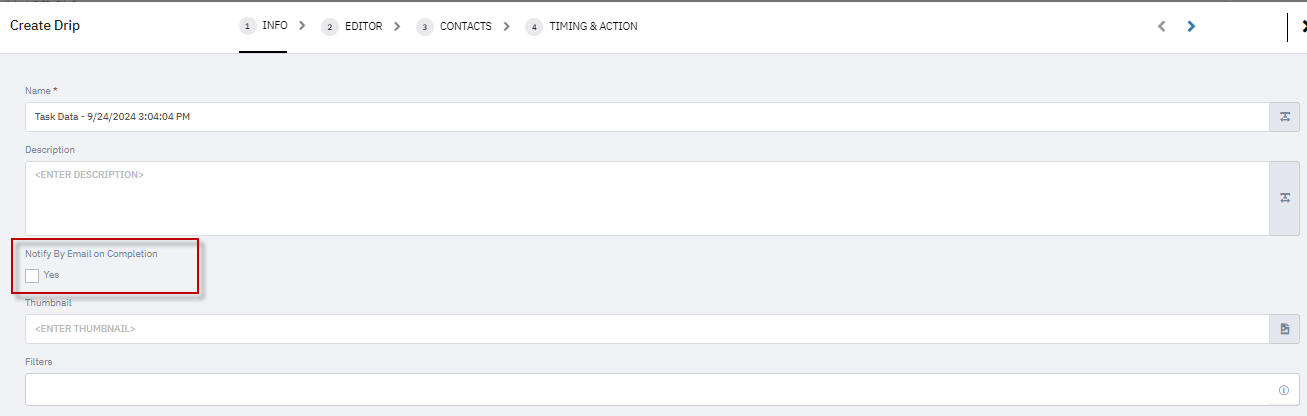
A new checkbox, Notify By Email on Completion, has been added while setting up an email campaign to notify users when the campaign is completed. To enable this, simply check the Notify By Email on Completion box during the campaign setup. Once enabled, the user for whom the campaign is set up will receive an email notification upon its completion.
A new “Download All Emails” option allows users (with appropriate permissions) to download a ZIP file containing all the emails from a shared drip template for offline review or further customization.
How It Works
Check Permissions
Ensure that download permissions are enabled for your role on the drip template.

Locate the Shared Drip Template
Go to the Media side of the Drip Campaign page or the Drip Templates page.
Look for the Download icon or the Preview button.


Download as ZIP
Click the Download All Emails option.


A ZIP folder containing the HTML files of each email will be saved to your computer.
Access & Edit Offline
Unzip the folder to view or edit the email content.
Important Note
This feature is only available for shared drip templates located in the media section, not for Running, Stopped, or Scheduled campaigns.
This update streamlines template management and enhances the usability of shared drip campaigns.